Drupal 7 theming a node form
我慢慢發現 content type node form 是繼 exposed views form 之後最常要修改的 form
(我明明有寫過 alter exposed views form, 但找不到...)
特定 content type 本身是沒有 theme function 的
先定義一個,順便定義使用一個 tpl 檔輸出
改變 form 的 template
這次修改的是 views 的 exposed form
需要比較大的修改便想要使用 tpl 而不使用 template.php
舊文 form 也可以使用template (*.tpl.php)也有說明, 但已經不是 Drupal6.x 作法了
以下更新為 Drupal6.x 的作法:
先自建一個模組, 使用 hook_theme
定義如下:
Drupal contact form use tpl.php 將聯絡表單的內容移到 tpl.php
其實我做的是一個contact module 的擴充, cck 的 email field
它可以建立一個送到特定 email 欄的聯絡表單, 是建基於內建的聯絡表單的擴展
而我需要將它的 html 完全改變, contact form 的修改應該很類似
步驟:
先在theme 注冊一個使用的 theme hook:
自定Views 欄位輸出 Views fields display
開發多了以後, 慢慢發展了一個自己比較喜歡的 views templating 方式, 分享一下
1. Row style
絕大部份 "Row style" 都會使用 "fields",
是為了靈活性, 可以在 "Fields" 取需要的欄位
相反 "Row style" "node" 只可以選擇 "full node" 或者 "teaser"
而且它的輸出就會使用 node.tpl.php
不方便, 我習慣自己建立 "frontpage" 資料夾專門用作放置該 views 的 template 的
2. *.tpl.php 儲存結構
續上, 一個 views 在該 theme 之內都有一個資料夾
甚至是一個 display 一個, 例如 views "frontpage":
--theme_joe (資料夾)
----frontpage (資料夾)
------views-view-fields--frontpage.tpl.php
----taxonomy (資料夾)
------views-view-fields--taxonomy.tpl.php
進階 views 模版(一): 簡介, 設定, tpl 檔 Complex views templating, part 1, intro, config, tpl
views 的 theming/templating 是Drupal theming 的高級班了
之前一直沒有信心將這個部份的教做好, 但這次都要挑戰一下難度, 唯有試試用多一點圖片展示了
首先, 我們常用的theme developer 是不能夠幫我們查出 tpl 的檔名的 (但仍可以看到可用的 vars)
因為 views 的 templating 機制雖和 Drupal core 的極相似, 但卻是views 自己定義的
主要是為了應付更複雜, 更多變的情況
但也不需要擔心, 概念上, 操作上都和我們一向做的非常相似
既然theme developer 不適用, views 有自己的 tpl suggestion: Basic settings 內的 Theme: information(下圖1)
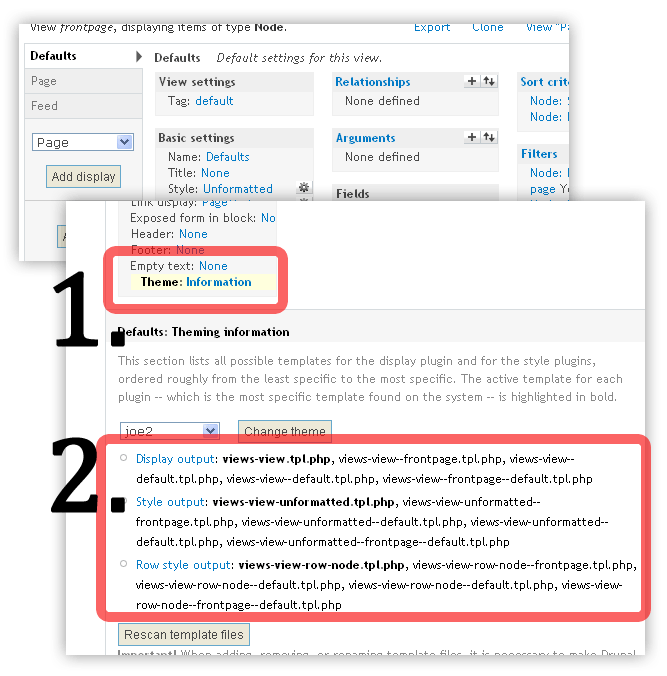
上圖二便是 tpl suggestions, 而粗體則是現正在使用的 tpl 檔
修改首頁的template
你可以使用一個和其他頁面完全不同的首頁, 只要你能應用 template suggestion.
打開你的theme_developer module, 指一下首頁,
你便會發現frontpage 是有一個特別的suggestion: page-front.tpl.php
你只要在你的theme folder 內建立/複製一個page-front.tpl.php,
然後你便可以開始加特別的class 到body,
或者使用完全不同的region (front-left, front-mid-left, front-mid-right, front-right)
把首頁變作4欄以應付首頁大量資料的需求
p.s. 記得清空你的cache 以使用新增的page-front.tpl.php
p.p.s 你當然也可以使用panels 之類的模組完成相同的效果
Theming search form, 搜尋框的模版
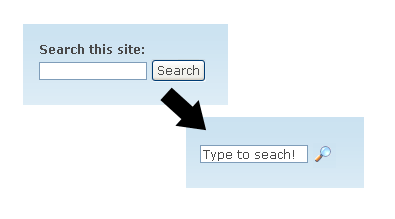
因為 drupal 原本內建的search form 搜尋框實在太單調的關係,
修改一下它的外觀, 模版...
當然, 先打開 search module(今天的主角), devel module, theme developer(開發用主角)
將search block 放到 sidebar,
用 theme developer 指一下,
便知道 search module 已經內建了搜尋框的 template 以供使用, 修改
search-block-form.tpl.php 是在 block 之內的 template
search-theme-form.tpl.php 便是其他情況下使用的 template
可以直接到 [base_path]/module/search 之內
複製所需的template 到你的 theme 之內
清空你的 cache 緩存, 你的theme 便會自動使用這個你新增的 template 檔了
其實一個搜尋框只有三種元素 (element)

