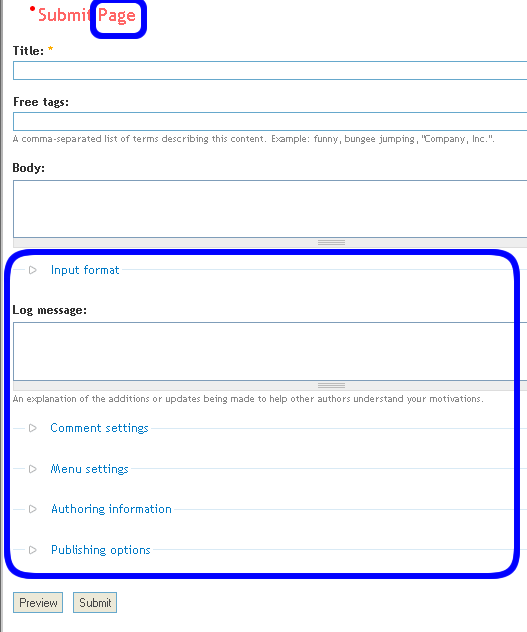
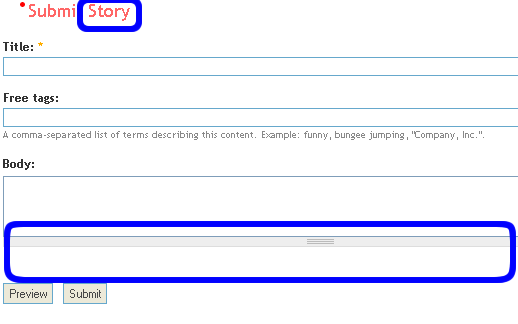
一個成熟而功能強大的Drupal,
除了使用內建的功能之外
一般都加上很多的模組, 以符合網站的需要
但簡單的一個新增node 的form 已經複雜得令人眼花燎亂

最好還是簡單的只留下Title, body, taxonomy 好.

這次從這個實例中嘗試控制theme() 函數,
令得出的HTML 符合實際需要, 消去不必要的元素
修改難度中級左右, 要懂得一點點form API,
基本template, phptemplate engine
記得一邊看一邊實驗哦
首先, 要知道任何新增node 都會使用 函數 (node.module line 2146)
函數會用drupal_render() 函數,
將$form 陣列變成HTML form
再返回這個form.
Drupal 內所有用theme_ 開始的函數都可以被 template.php 內的 phptemplate_ 函數取代
所以, 只要新增一個 phptemplate_node_form() 函數到 template.php
複製theme_node_form() 函數內容到 phptemplate_node_form()
再修改函數內容, 就可以自己定製一個對特定theme 有效的 node form 了
theme_node_form() 的內容可能比較複雜
但因為這個例子比較有用, 普遍有實用性, 故選之
文章結尾部分會再詳細探討修改的方法
但如果有很多theme_ 函數要修改, template.php 會很大
而且很難維護, 一個檔案大於一千五百行就會令維護的工作以幾何級數上升
所以要借用Drupal 6.x 的一個概念, 使用 *.tpl.php 作 node_form 的template.
建立一個node_form.tpl.php,
然後在phptemplate_node_form() 內,
用類似呼叫node-contenttype.tpl.php 的方法, 找出 node_form.tpl.php
並使用它代替原本於 phptemplate_node_form() 內的php
實際操作很簡單,
template.php:
<?php
function phptemplate_node_form($form) {
return _phptemplate_callback('node_form', array('form' => $form));
}
?>_phptemplate_callback($hook, $variables = array(), $suggestions = array())
定義於drupal/themes/engines/phptemplate/phptemplate.engine
傳入最少一個, 最多三個參數.
第一個是 *.tpl.php 的 * 號的預設字符
上面的例子傳入 'node_form', 函數就會找一下 node_form.tpl.php 使用了
第二個參數是一個array, 給 *.tpl.php 的變數, 例子用了array('form' => $form)
前面的 'form' 在 *.tpl.php 內存在, 後面的 $form 在 phptemplate_node_form() 內存在
最後一個是array, 提供一個優先於 $hook 的一個template 名字的選擇.
node_form.tpl.php 內只要使用原本於theme_node_form() 內的php 就可以了
最後的一個部分, 終於到了改theme_node_form() 的內容了
node.module line 2146 原本的內容:
<?php
function theme_node_form($form) {
$output = "\n<div class=\"node-form\">\n";
// 將author, option 兩個選項放到$admin, 以放到form 的最後
$admin = '';
if (isset($form['author'])) {
$admin .= " <div class=\"authored\">\n";
$admin .= drupal_render($form['author']);
$admin .= " </div>\n";
}
if (isset($form['options'])) {
$admin .= " <div class=\"options\">\n";
$admin .= drupal_render($form['options']);
$admin .= " </div>\n";
}
// 將按鈕都組合到一起, 備用
$buttons = drupal_render($form['preview']);
$buttons .= drupal_render($form['submit']);
$buttons .= isset($form['delete']) ? drupal_render($form['delete']) : '';
// 全部餘下沒有用drupal_render() 的$form 都會在此變成HTML(即除了admin, buttons 以外的全部)
$output .= " <div class=\"standard\">\n";
$output .= drupal_render($form);
$output .= " </div>\n";
if (!empty($admin)) {
$output .= " <div class=\"admin\">\n";
$output .= $admin;
$output .= " </div>\n";
}
$output .= $buttons;
$output .= "</div>\n";
return $output;
}
?>drupal_render() 會將傳入的參數返回, 變成HTML
最後一個的drupal_render() 傳入整個$form
會將全部還沒有render 的inputs 變成HTML
最後返回HTML
要留意的是node_form.tpl.php 內不應返回HTML
而是:
<?php
print $output;
?>上面的例子將某些選定的form 用一個<div style="display:none;"> 包起
令用戶看不見, 但form API 看得見
例如要隱藏log textarea , 先在node_form.tpl.php用 print_r($form);
看看$form 內那一個控制log textarea
得知是$form['log'], 就:
<?php
$hidden .= drupal_render($form['log']);
//input format
$hidden .= drupal_render($form['body_filter']['format']);
//comment settings
$hidden .= drupal_render($form['comment_settings']);
//放$hidden 到output
$output .= "<div style='display:none;'>$hidden</div>";
?>放在最後一個drupal_render($form) 之前就可以了
最後, 其實phptemplate_node_form() 還可以做很多東西
例如只令用戶id = 1 才使用 *.tpl.php,
實際操作我還先查有沒有 [contenttype]-node_form.tpl.php
如沒有, 用回 theme_node_form()等等, 非常強大而靈活
| Attachment | Size |
|---|---|
| form_template-1.png | 61.58 KB |
| form_template-2.png | 48.92 KB |

Comments
寫的太好了
怎麼隱藏這些欄位肯定是許多人都很想知道的
小弟之前一直使用直接hack core 的骯髒方式
現在看了大大的精闢教學
確實獲益匪淺
大大真的是佛心來的~
感恩捏!!
謝謝支持~
謝謝支持~
来自大陆的,真挚感
来自大陆的,真挚感谢!
多謝支持, 又可以看看
多謝支持,
又可以看看最新的一篇, 可以說是續章
http://www.joetsuihk.com/define-comment-template
非常好的资料,才发
非常好的资料,才发现
谢谢
感谢分享,支持继续,就泡这里了
Hierarchical Select的Form
hi!我遇到一個比較進階的問題,
就是在custom form的時候,
要用drupal_render($form['taxonomy']['3']);
taxonamy的vid是3,但我有裝Hierarchical Select。


在預設的表單是正常的,可以選主分類,會自動變出次分類,
像是這樣
點下去之後是這樣,會有次分類出來可以選
但是我自定Form之後,這是我的原始碼:
在template.php
<?php
/**
* 編排 CCK 表單的顯示方式
*
*
*/
function phptemplate_lifestyle_node_form($form) {
global $user;
$vars = array('user' => $user, 'form' => $form);
$vars['title'] = drupal_render($form['title']);
$vars['body'] = drupal_render($form['body_filter']);
//以下是有Hierarchical Select功能的taxonamy,vid是3
$vars['location'] = drupal_render($form['taxonomy']['3']);
return _phptemplate_callback('lifestyle_form', $vars);
}
?>
這是lifestyle_form.tpl.php
<?php
drupal_set_message('<pre>' . print_r($form, true) . '</pre>');
?>
<?php print $title; ?>
<?php print $location; ?>
是有出現下拉選單,可是第二層出不來,像這樣。

變這樣之後重新整理,會有這樣的錯誤訊息:
warning: Missing argument 1 for drupal_retrieve_form() in /Applications/MAMP/htdocs/projects/alpha.facepet.com.tw/includes/form.inc on line 179.
warning: call_user_func_array() [function.call-user-func-array]: First argumented is expected to be a valid callback, '' was given in /Applications/MAMP/htdocs/projects/alpha.facepet.com.tw/includes/form.inc on line 218.
warning: uasort() [function.uasort]: The argument should be an array in /Applications/MAMP/htdocs/projects/alpha.facepet.com.tw/includes/common.inc on line 2145.
真難過耶!不知道是什麼問題。
然後print_r有出現這些(我貼taxonamy的部份),給您參考。
(print_r我用$form,若是print_r是用$vars,會只出現array這個字)
Array
(
[taxonomy] => Array
(
[3] => Array
(
[#type] => hierarchical_select
[#title] => 地區
[#default_value] => Array
(
)
[#description] => 選擇店家地區
[#multiple] => 0
[#weight] => 0
[#required] => 1
[#config] => Array
(
[module] => hs_taxonomy
[params] => Array
(
[vid] => 3
[exclude_tid] =>
[root_term] =>
)
[config_id] => taxonomy-3
[save_lineage] => 0
[enforce_deepest] => 0
[entity_count] => 0
[resizable] => 0
[level_labels] => Array
(
[status] => 0
[labels] => Array
(
[0] =>
[1] =>
)
)
[dropbox] => Array
(
[status] => 0
[limit] => 0
[reset_hs] => 1
[title] =>
)
[editability] => Array
(
[status] => 1
[item_types] => Array
(
[0] =>
[1] =>
)
[allowed_levels] => Array
(
[0] => 0
[1] => 1
)
[allow_new_levels] => 0
[max_levels] => 1
)
)
[#programmed] =>
[#tree] => 1
[#parents] => Array
(
[0] => taxonomy
[1] => 3
)
[#processed] => 1
[#attributes] => Array
(
)
[#input] => 1
[#process] => Array
(
[hierarchical_select_process] => Array
(
)
)
[#name] => taxonomy[3]
[#id] => edit-taxonomy-3
[#value] => Array
(
)
[hsid] => Array
(
[#type] => value
[#value] => 0
[#post] =>
[#programmed] =>
[#tree] => 1
[#parents] => Array
(
[0] => taxonomy
[1] => 3
[2] => hsid
)
[#weight] => 0
[#processed] =>
[#description] =>
[#attributes] => Array
(
)
[#required] =>
[#input] => 1
[#name] => taxonomy[3][hsid]
[#id] => edit-taxonomy-3-hsid
[#sorted] => 1
)
[hierarchy] => Array
(
[#type] => value
[#value] => stdClass Object
(
[lineage] => Array
(
[0] => label_0
)
[levels] => Array
(
[0] => Array
(
[label_0] =>
[11] => 南投縣
[9] => 台中市
[10] => 台中縣
[3] => 台北市
[4] => 台北縣
[16] => 台南市
[17] => 台南縣
[22] => 台東縣
[14] => 嘉義市
[15] => 嘉義縣
[1] => 基隆市
[2] => 宜蘭縣
[20] => 屏東縣
[12] => 彰化縣
[5] => 新竹市
[6] => 新竹縣
[7] => 桃園縣
[23] => 綠島
[21] => 花蓮縣
[8] => 苗栗縣
[24] => 蘭嶼
[13] => 雲林縣
[18] => 高雄市
[19] => 高雄縣
)
)
[childinfo] => Array
(
[0] => Array
(
[11] => 0
[9] => 1
[10] => 0
[3] => 3
[4] => 9
[16] => 0
[17] => 0
[22] => 0
[14] => 0
[15] => 0
[1] => 0
[2] => 0
[20] => 0
[12] => 0
[5] => 0
[6] => 0
[7] => 1
[23] => 0
[21] => 0
[8] => 0
[24] => 0
[13] => 0
[18] => 0
[19] => 0
)
)
[build_time] => Array
(
[total] => 48.201
[lineage] => 3.972
[levels] => 1.146
[childinfo] => 43.059
)
)
[#post] =>
[#programmed] =>
[#tree] => 1
[#parents] => Array
(
[0] => taxonomy
[1] => 3
[2] => hierarchy
)
[#weight] => 0.001
[#processed] =>
[#description] =>
[#attributes] => Array
(
)
[#required] =>
[#input] => 1
[#name] => taxonomy[3][hierarchy]
[#id] => edit-taxonomy-3-hierarchy
[#sorted] => 1
)
[hierarchical_select] => Array
(
[#prefix] =>
[#suffix] =>
[selects] => Array
(
[#tree] => 1
[#prefix] =>
[#suffix] =>
[0] => Array
(
[#type] => select
[#options] => Array
(
[label_0] =>
[11] => 南投縣
[9] => 台中市
[10] => 台中縣
[3] => 台北市
[4] => 台北縣
[16] => 台南市
[17] => 台南縣
[22] => 台東縣
[14] => 嘉義市
[15] => 嘉義縣
[1] => 基隆市
[2] => 宜蘭縣
[20] => 屏東縣
[12] => 彰化縣
[5] => 新竹市
[6] => 新竹縣
[7] => 桃園縣
[23] => 綠島
[21] => 花蓮縣
[8] => 苗栗縣
[24] => 蘭嶼
[13] => 雲林縣
[18] => 高雄市
[19] => 高雄縣
)
[#default_value] => label_0
[#DANGEROUS_SKIP_CHECK] => 1
[#theme] => hierarchical_select_select
[#childinfo] => Array
(
[11] => 0
[9] => 1
[10] => 0
[3] => 3
[4] => 9
[16] => 0
[17] => 0
[22] => 0
[14] => 0
[15] => 0
[1] => 0
[2] => 0
[20] => 0
[12] => 0
[5] => 0
[6] => 0
[7] => 1
[23] => 0
[21] => 0
[8] => 0
[24] => 0
[13] => 0
[18] => 0
[19] => 0
)
[#size] =>
[#post] =>
[#programmed] =>
[#tree] => 1
[#parents] => Array
(
[0] => taxonomy
[1] => 3
[2] => hierarchical_select
[3] => selects
[4] => 0
)
[#weight] => 0
[#processed] =>
[#description] =>
[#attributes] => Array
(
)
[#required] =>
[#input] => 1
[#name] => taxonomy[3][hierarchical_select][selects][0]
[#id] => edit-taxonomy-3-hierarchical-select-selects-0
[#value] => label_0
[#sorted] => 1
)
[#post] =>
[#programmed] =>
[#parents] => Array
(
[0] => taxonomy
[1] => 3
[2] => hierarchical_select
[3] => selects
)
[#weight] => 0
[#processed] =>
[#sorted] => 1
)
[#weight] => 0
[#post] =>
[#programmed] =>
[#tree] => 1
[#parents] => Array
(
[0] => taxonomy
[1] => 3
[2] => hierarchical_select
)
[#processed] =>
[#sorted] => 1
)
[nojs] => Array
(
[#prefix] =>
[#suffix] =>
[update_button] => Array
(
[#type] => button
[#value] => 更新
[#attributes] => Array
(
[class] => update-button
)
[#post] =>
[#programmed] =>
[#tree] => 1
[#parents] => Array
(
[0] => taxonomy
[1] => 3
[2] => nojs
[3] => update_button
)
[#weight] => 0
[#processed] =>
[#description] =>
[#required] =>
[#input] => 1
[#name] => op
[#button_type] => submit
[#executes_submit_callback] =>
[#id] => edit-taxonomy-3-nojs-update-button
[#sorted] => 1
)
[update_button_help_text] => Array
(
[#value] => You don't have Javascript enabled. Hover for more information! But don't worry: you can still use this web site! You have two options:
enable Javascript in your browser and then refresh this page, for a much enhanced experience.
click the Update button every time you want to update the selection.
[#prefix] =>
[#post] =>
[#programmed] =>
[#tree] => 1
[#parents] => Array
(
[0] => taxonomy
[1] => 3
[2] => nojs
[3] => update_button_help_text
)
[#weight] => 0.001
[#processed] =>
[#sorted] => 1
)
[#weight] => 3
[#post] =>
[#programmed] =>
[#tree] => 1
[#parents] => Array
(
[0] => taxonomy
[1] => 3
[2] => nojs
)
[#processed] =>
[#sorted] => 1
)
[dropbox_limit_warning] => Array
(
[#weight] => 1
[#post] =>
[#programmed] =>
[#tree] => 1
[#parents] => Array
(
[0] => taxonomy
[1] => 3
[2] => dropbox_limit_warning
)
[#processed] =>
[#sorted] => 1
)
[dropbox] => Array
(
[#weight] => 2
[#post] =>
[#programmed] =>
[#tree] => 1
[#parents] => Array
(
[0] => taxonomy
[1] => 3
[2] => dropbox
)
[#processed] =>
[#sorted] => 1
)
[#return_value] =>
[#validate] => Array
(
[_hierarchical_select_validate] => Array
(
)
)
)
上面那個已解決
不好意思, 上面那篇留言很長, 現在問題解決了!(可以刪掉它)
在這邊:
http://drupaltaiwan.org/forum/20081028/2705
Post new comment