views

自定Views 欄位輸出 Views fields display

開發多了以後, 慢慢發展了一個自己比較喜歡的 views templating 方式, 分享一下

1. Row style
絕大部份 "Row style" 都會使用 "fields",
是為了靈活性, 可以在 "Fields" 取需要的欄位
相反 "Row style" "node" 只可以選擇 "full node" 或者 "teaser"
而且它的輸出就會使用 node.tpl.php
不方便, 我習慣自己建立 "frontpage" 資料夾專門用作放置該 views 的 template 的

2. *.tpl.php 儲存結構
續上, 一個 views 在該 theme 之內都有一個資料夾
甚至是一個 display 一個, 例如 views "frontpage":
--theme_joe (資料夾)
----frontpage (資料夾)
------views-view-fields--frontpage.tpl.php
----taxonomy (資料夾)
------views-view-fields--taxonomy.tpl.php

3. 專注在 "Row style" 自定輸出
在 theme information 中的 views-view-field*.tpl.php 是最好用的
可以自定以一個 result 為單位的 templates,
通常我都將views 自定的 HTML tags 全部移除
換上我需要的, 以一個 row 為單位重覆的 HTML,

<div class="row">
  <div class="pic"><?php echo $field_picture[0]['view'?></div>
  <div class="right">
    <div class="title"><?php echo $title; ?></div>
    <div class="description"><?php echo $field_description[0]['view'?></div>
  </div>
</div>

要留意的是, 使用 <?php echo $field_description[0]['view'?>
便要自己設定 "display as"
上例的的 picture 便要使用 "image" 或者 "image link to node"
而不可以使用 "generic file" 或者 "URL to file"

又或者, 你打算 image 的 alt 使用 title,
pic 用 "URL to file", views-view-fields*.tpl.php:

<img src="<?php echo $field_picture[0]['view'?>" alt="<?php echo $title; ?>" />

Node "back" referenc-ing 反向節點連結


Node reference 是一種 cck 的欄位
用以放入另一個節點, 建立節點之間的關係
簡單的樹狀結構便可以使用 node reference 來建立主從關係

但今次要討論的是 "反向的 node reference"
想像兩個 content type "project" 和 "task"
"task" 需要一個 node reference 欄位指定它的所屬 "project"
但 "project" 頁面便需要一個 list of tasks
而也不可能在 "project" 同樣建立 node reference 到 "task"
太費時了, 既是雙重輸入 (double entry), 又 "project" 可以有很多 "task", 難以管理

其實反向 node reference 只是一個 views,
使用 node reference 作 filter, 限定某 NID 便可以
只是, 每新加一個 "project" 便需要一個 views
再推導出應該使用 views arguments 傳入 "NID from URL"
反向節點連結便 ok 了

views 表格頭 theming (table header theming)

先修文章:
http://joetsuihk.com/node/94
http://joetsuihk.com/node/95

Views 的table header是可以使用 *.tpl.php 修改的,
常見的應用包括使用 icon 而不使用 text 作為 label
只要修改 style output 的 views-view-table.tpl.php

<?php
// $Id: views-view-table.tpl.php,v 1.8 2009/01/28 00:43:43 merlinofchaos Exp $
/**
* @file views-view-table.tpl.php
* Template to display a view as a table.
*
* - $title : The title of this group of rows.  May be empty.
* - $header: An array of header labels keyed by field id.
* - $fields: An array of CSS IDs to use for each field id.
* - $class: A class or classes to apply to the table, based on settings.
* - $row_classes: An array of classes to apply to each row, indexed by row
*   number. This matches the index in $rows.
* - $rows: An array of row items. Each row is an array of content.
*   $rows are keyed by row number, fields within rows are keyed by field ID.
* @ingroup views_templates
*/
?>

<table class="<?php print $class; ?>">
  <?php if (!empty($title)) : ?>
    <caption><?php print $title; ?></caption>
  <?php endif; ?>
  <thead>
    <tr>
<?php //表格頭輸出開始: ?>
      <?php foreach ($header as $field => $label): ?>
        <th class="views-field views-field-<?php print $fields[$field]; ?>">
          <?php print $label; ?>
        </th>
<?php //表格頭輸出完結:?>
      <?php endforeach; ?>
    </tr>
  </thead>
  <tbody>
    <?php foreach ($rows as $count => $row): ?>
      <tr class="<?php print implode(' ', $row_classes[$count]); ?>">
        <?php foreach ($row as $field => $content): ?>
          <td class="views-field views-field-<?php print $fields[$field]; ?>">
            <?php print $content; ?>
          </td>
        <?php endforeach; ?>
      </tr>
    <?php endforeach; ?>
  </tbody>
</table>

開發者只需要將 foreach 改成多個 if
就個別欄位表格頭輸出所需之 icon 圖像

看似簡單, 但如果表格頭需要 sortable, 並指示排序方向的話
便要再加一個 if case 檢查 $_GET['order'] 作不同輸出
奇怪 $views 變數之中竟然沒有 sort order 的資料

魔鬼都在細節之中...

2010-05-18 Drupal db_query vs views 的比較, 開發時要注意的地方

一直看到國內的進階 Drupal 教程都會提到使用 db_query() 用以代替 views, 例如: http://drupalchina.org/node/9021
觀點大概是 views 使用太多資源了, 使用 db_query() 能直接存取數據資料, 性能上會比較好,
也更自由等等

以下是我的個人意見:

雖然是進階的教程, 但開發者在有其他可使用的方法之下直接存取是不可取的, 原因:

1.安全問題
這是最重要的一點, 避開 sql-injection, xss
在自定義的代碼之中, 有太多入門的開發者忽視或不重視數據安全的問題
在不清楚如何編寫安全的 Drupal 代碼之前已經開始開發
而 views 的設計上已經極大量的考量安全問題
至少, views 之類的大型模組, 單單是測試者的數量可能已經比美你的訪客人數
所以, "自定義的代碼 會/可以 和 views 一樣安全" 是不成立的
views 一定比自定義的代碼安全
ref: http://drupal.org/writing-secure-code

2. 可變性
使用 views 的好處還有可變性強
這很明顯, 使用views 的 web admin 修改代碼一定會比修改自定義的快
在這個永遠活在 beta 版的網頁開發世界, 這一定是一個重要的優勢
多出的時間應該要用於編寫幫助文件或者用於測試等等的地方

3. 性能
這是一個沒有正確答案的問題:
使用views 是否一定會比較慢?
views 本身並不只是一個sql 產生器, 它還內建緩存機制
就好像 variables_get() 函數, Drupal 會將會個 variables table 放到一個 cache
一個 select 便可以存取全個 variables table 之內的數值
而類似的機制也出現在views
當然, 一個精心設計的 sql 會比 views 快,
但這個精心設計所帶來的性能是否可以補回以上的問題便值得仔細研究了

4. 培養良好的開發習慣
"良好的開發習慣" 很抽象
但基本的例如 *.tpl.php 之內不應該有顯示視圖以外的功能/代碼
又或者 CSS 應集中於一個css 檔之內而不應使用inline: <a style="color:red;">joe</a>
不應修改 Drupal 的核心代碼等等
這些習慣其實是可以由使用 contributed modules 來培養的
因為它們會定好習慣, 而你順著使用便會是最快的開發方式
然後藉此 "培養更多的良好的開發習慣"

最後, 這些都是我的觀點, 也是我見過的其他 Drupal 國外高手的潛規則
希望大家深入討論, 思考

進階 views 模版(二): HTML 列表 Complex views templating, part 2, table, HTML list templates

part1

補一下 table 顯示之下的 theming.

假如你的 table 有4個 fields, views 的 theming information 便有6個 templates:
1個 display 的 tpl (page 或block)
1個 style tpl, 包含了 <table>
每1個 field 都可以有一個自己的 tpl (詳見 attachment)

HTML list (ul, ol) 也是同樣的情況
display + style tpl, 外加每個field 一個tpl
也可以做 field by field 的 tpl, 修改 <ul> 的class, <li>多個 span 之類

最後, 雖然和 views 無關, 但pager 也經常由 views 產生
但 views 的 pager 都是使用 core 的pager, theme_pager()
theme 的時候沒有 tpl, 要在 template.php 修改, 或者使用preprocess 提供 tpl

進階 views 模版(一): 簡介, 設定, tpl 檔 Complex views templating, part 1, intro, config, tpl

views 的 theming/templating 是Drupal theming 的高級班了
之前一直沒有信心將這個部份的教做好, 但這次都要挑戰一下難度, 唯有試試用多一點圖片展示了

首先, 我們常用的theme developer 是不能夠幫我們查出 tpl 的檔名的 (但仍可以看到可用的 vars)
因為 views 的 templating 機制雖和 Drupal core 的極相似, 但卻是views 自己定義的
主要是為了應付更複雜, 更多變的情況
但也不需要擔心, 概念上, 操作上都和我們一向做的非常相似

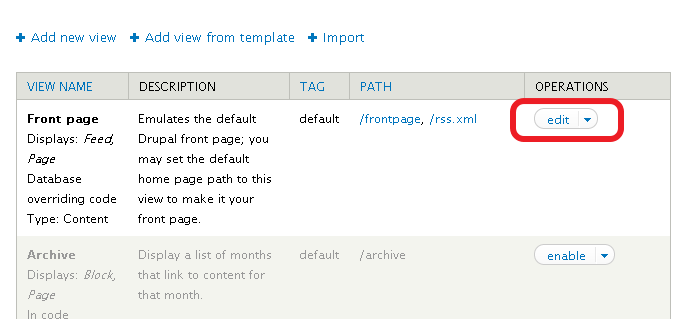
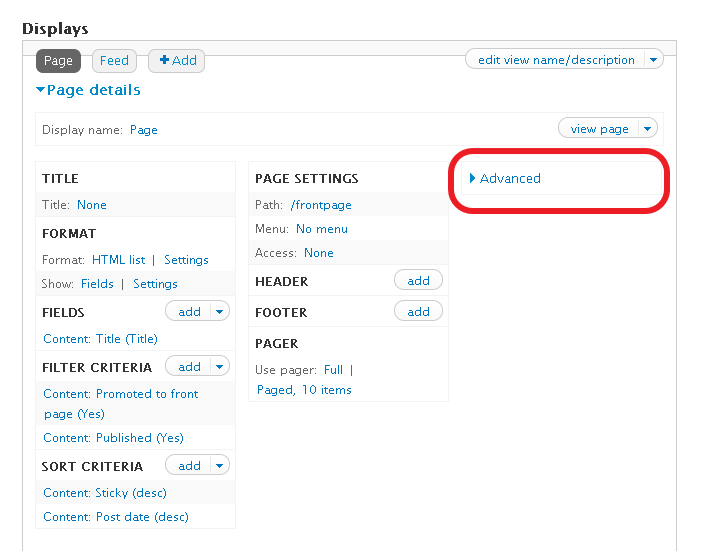
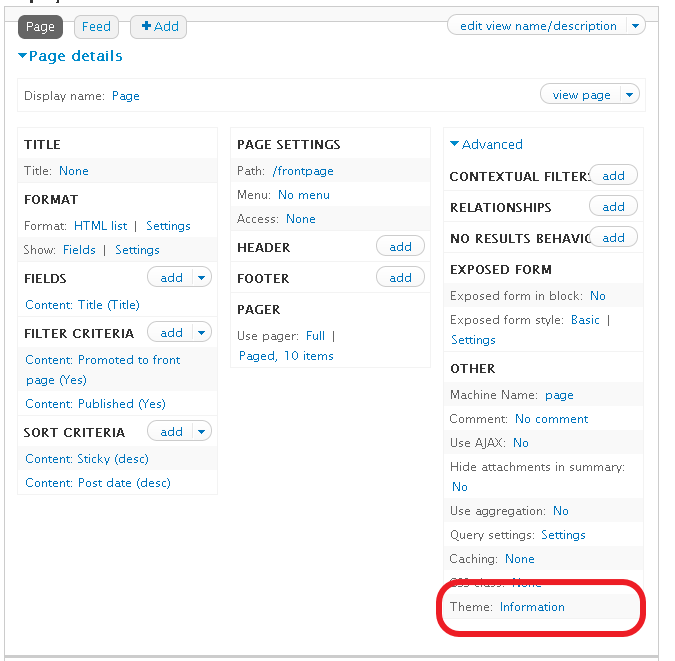
既然theme developer 不適用, views 有自己的 tpl suggestion: Basic settings 內的 Theme: information(下圖1)

上圖二便是 tpl suggestions, 而粗體則是現正在使用的 tpl 檔

你可以看到, 一個views 便有三個為一組的 tpl,
而其實如果你使用 "fields" 的話, 你的 views display 更由四個 tpl 組成

我們看看三個 tpl 各自負責那一部份的 output:

你會發現, display output 和 row style output 重叠了
那是因為我正在使用 "unformatted", 如果你用 "table" 或者 "unordered list"
row style output 便會改變成 table, ul tags 了

假如你鎖定了某一個 tpl, 你可以從 views 內建的 code 開始
你只要點一下 "display output", 你便會得到views 自己內建的 tpl code了
而且內建的 code comment 都很清楚, 只是需要更多變數的話, 還是使用 theme developer 點一下就好了.

待續..

views 中只顯示屬於自己角色的頁面

來自社區的一個問題: http://drupalchina.org/node/8514#comment-26113
比如我是 "writer" role, 我想要一個頁面都是 writer role 的用戶的nodes:

views 的 argument 應:
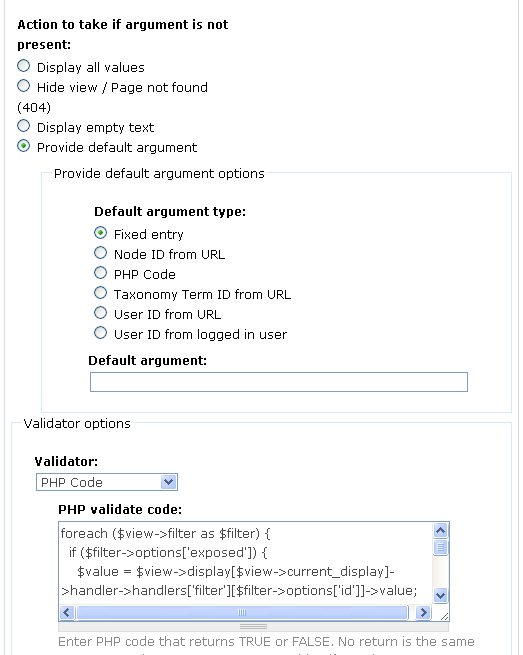
加, User:roles -> Provide default argument
Default argument type: PHP code:

<?php
global $user;
$roles = implode("+",array_keys($user->roles));
return
$roles;
?>

再選 Allow multiple terms per argument.

解說: 先拿到用戶object
再拿出用戶的所在的 role id
因為可以多個role, 需要implode 成 2+5
Allow multiple terms per argument 便會 OR role id 了

[views 2.0 版] 使用 views 建立tabs, use view to build tabs

tabs 一直是Drupal 中比較少特別提及的功能之一
用戶頁 user/[uid] 便是一個很標準的tab 應用
"view"/"edit" tab 也常見於node 頁

使用views 可以很方便的建立tabs
前文Drupal 5 版: http://www.joetsuihk.com/node/112 中已經介紹過
那是Drupal5, views1 的版本
這次介紹 Drupal6, views2 的版本的設定方法

這次是建立一個tab
顯示用戶建立的node 之中, 留言數目大於10 的頁面, 定義為 "hot"
路徑 user/[uid]/hot
如圖:

我從內建的 tracker 模組的views 開始,
用 clone, 建立一個新的views,
其中, page 的設定:

page settings: 選menu tab
(Default meni tab 是作為預設顯示時才用, 如路徑 user/[uid] )
之後設定頁面的Title, 便完成了

使用 views 建立tabs, use view to build tabs

上圖顯示了一個經過修改的 user page 的 tabs

tabs 其實來自一個 hook(), menu_local_tasks()
用 theme developer 指一下便可以看到
但這次介紹的並不是要修改這個 hook 的 theme template
而是使用 views, 新增一個tab 到這個地方

在上圖的例子,
一個 url 為 [root]/user 的 頁面,
要在 views 建立一個的 tab, >Read more

2008-07-07 views2.0-rc1

相信大家都知道Views, cck, OG 三大模組都推出了對應 Drupal6.x 的 RC(release candidate) 了

其實我一直找不到一個合理的原因轉到6, 主要因為很多重要的功能都不能只由 Drupal6 核心提供
Drupal6 只變成一個有完型多語言功能的部落格, 和一個CMS, 內容管理系統有一段距離
加上 Drupal7.x 的開發又加快了不少, 我一度擔心過 Drupal6.x 不會流行而直接跳到 Drupal7.x, 發生像 xoops 分成兩個版本的狀況.
但現在看來似乎是過於擔心了, 立即先看看Views2.0 的新功能吧!

安裝過Views2.0, 便立即 >Read more