2010-03-04 更新到 Drupal 6.16
更新發現了一個在icdsoft 實用的功能
就是resotre
因為我的 .htaccess 和 cron.php 不是 Drupal default 的,
我加了些少 logic, 更新以後便變回原本的版本
restore 可以 restore 最多 5 日的data,
而且可以 "單一/多個" "檔案/資料夾", click 一下便 restore 了, 方便!
UPDATE1: .htaccess in 6.16 had been modified as: http://drupal.org/node/638030
Drupal .htaccess block file access
In Drupal, in addition to hosting in icdsoft,
i have a php.ini file and maybe a backup folder(i do not have) that do not want unaurotized access
use .htaccess to do the job as:
<Files ~ "php\.ini|install\.php">
  Order allow,deny
  Deny from all
</Files>
which block php.ini and install.php from access by anyone from web
MVC in Drupal
在Drupal 要maintain 一個完整的MVC 結構其實不容易
因為template engine 的功能太強大, 而且我們的習慣又免得修改 module
所以好多在controller 和views 界線之間的修改都會在template 內做
在我從其他的framework 中得到的MVC concept,
覺得其中一部份的修改其實是應該用修改controller 實現的
但因為上面的原因, 便選擇了用Views 處理
我都正在試驗自定一個module 來 customize 部份功能,
又能令其他 contrib module 的升級不受影響
其中一個想法是,
要分開"需要的功能" 和 "garland 不需要的功能"
應該能清楚的分辨什麼應該在Views, 什麼不應該的煩惱
theme 使用theme 自己的 *.tpl.php, build a custom hook_theme() on a theme
一個module 需要輸出html 的話, 會使用 hook_theme()
但如果一個theme 都需要輸出特定的html, 或者需要使用 *.tpl.php的話
因為Drupal 6 新增了 theme registry,
以前 Drupal 5 的theme 內的theme() 函數都不會自動加到theme registry
要在 template.php 內:
/*
template.php
*/
function [theme_name]_theme(){
  return array(
    'taxonomy' => array(
      'template' => 'taxonomy',
      'arguments' => array('taxonomy'=>NULL),
    ),
  );
}
便可以在theme_name 資料夾內使用taxonomy.tpl.php:
2009-04-14 本站順利升級到 Druapl 6.10, successfully upgraded to Drupal 6.10
終於都抽了時間將我這個站升到 Drupal 6.10
也是為了展示給客戶吧, haha
因為我的站的結構比較簡單,
幾乎是無痛升級
linux 的 untar, wget, cp 等等的命令都練得很熟了
只有我這個custom theme 需要一點點的代碼升級
都只是一個半個小時的工作而已
太順利了!
1. 將5.x 之下的全部模組, core 都升到最新版
2. backup
3. disable第三方模組
4. 覆蓋 Drupal6.10, upgrade.php
5. 一個一個將第三方模組升級
Finally, dug some time to upgrade this site to Drupal 6.10,
have to demonstrate to my clients, haha
將註冊時連續輸入兩次密碼的表單的字眼改掉
將註冊時連續輸入兩次密碼的表單的字眼改掉的方法:
theme 的 template.php 內:
Drupal6.x 自定form template
今日重看form template 的組成 :http://www.joetsuihk.com/form_templates6
混亂得我自己都看不明白, 所以重寫
目的: 重新排位, 令建立新node 的表單簡單點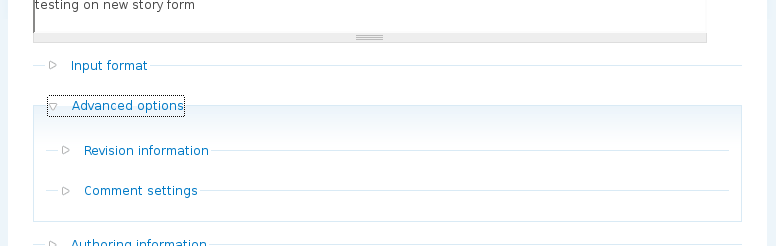
假設: 要重新排位的 content type 名為 story
Devel block.tpl.php
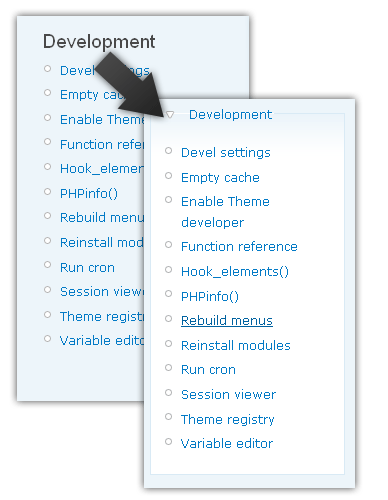
devel 的 module block,
作為一個 Drupal 開發者, 是必須將它安放到 sidebar 吧
但這個 block 有一個很惱人的問題,
就是, 它太佔位置了
一整條長長的, 放了在 sidebar 之後
經常要使用滾動條, 十分不便
所以, 唯有用 theme 的方式, 將它獨立放到一個下拉式隱藏之內
省回些位置
做成了上圖的效果
製作:
先用 theme developer, 指向 devel block
它已經提供了一個最精確, 權限最高的 template 命名: block-menu-devel.tpl.php
將 theme 內的 block.tpl.php 複製,
並命名為 block-menu-devel.tpl.php
修改其內容:
Theming search form, 搜尋框的模版
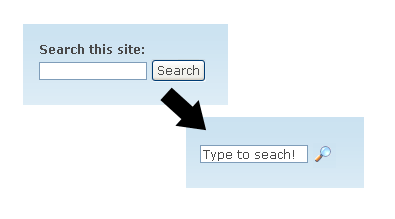
因為 drupal 原本內建的search form 搜尋框實在太單調的關係,
修改一下它的外觀, 模版...
當然, 先打開 search module(今天的主角), devel module, theme developer(開發用主角)
將search block 放到 sidebar,
用 theme developer 指一下,
便知道 search module 已經內建了搜尋框的 template 以供使用, 修改
search-block-form.tpl.php 是在 block 之內的 template
search-theme-form.tpl.php 便是其他情況下使用的 template
可以直接到 [base_path]/module/search 之內
複製所需的template 到你的 theme 之內
清空你的 cache 緩存, 你的theme 便會自動使用這個你新增的 template 檔了
其實一個搜尋框只有三種元素 (element)
2008-07-13 cck 6.x-2.0rc4
既然views 和cck 已經成為Drupal 中不可或缺的元素,
當然也要寫一篇Drupal6.x cck 的rc 試用報告
如果你還在問什麼是cck, 它是用來做什麼的話,
建議你先看看 什麼是cck
這篇試用文假設讀者們已經有過簡單使用cck 的經驗為基礎的
假如還是有一點點不明白
用OOP 為比喻
內建的post, story 就是base class, 基類
cck 就提供了extend 擴展方法
令node 這個物件有它自己的子類
子類又有它自己的參數, 成員, 作為一種管理資料的手段
cck2.0 相對1.0 的版本
改變算不上多, 主要的加強包括內建了 "欄級權限控制"
和一些介面上的改進

