Tabbed Block

Tabbed Block

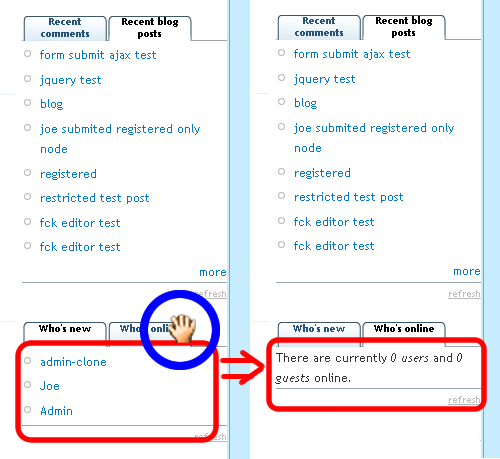
This is a module that you can embed different blocks into one with tabs.
Those tabs switch with javascript based on jquery, shorten your sidebars without reducing the content of your page.

The offical homepage on drupal.org is opened:
http://drupal.org/project/tabbed_block
The below svn is outdated, please use files on Drupal.org, and svn will dropout from the site soon.

svn address: http://www.joetsuihk.com/svn/drupal_modules/tabbed_block/trunk

這個模組可以將多個區塊整合到一個之中,
並使用jquery 這個javascript 庫來幫助使用者瀏覽
令你的左右兩邊的導航條縮短但又不用放棄某些內容

這模組已經放到 Druapl 主站上的模組專頁:
http://drupal.org/project/tabbed_block
下面的svn 已經不會再更新, 請到drupal.org 內查看更新

svn 地址: http://www.joetsuihk.com/svn/drupal_modules/tabbed_block/trunk


Tabbed Block 1.0.0

這是第一個正式發佈版Tabbed Block

這個模組可以將多個區塊整合到一個之中,
並使用jquery 這個javascript 庫來幫助使用者瀏覽
令你的左右兩邊的導航條縮短但又不用放棄某些內容

和v0.6a1 的分別主要為臭蟲修正.

First Official release of Tabbed Block.

This is a module that you can embed different blocks into one with tabs.
Those tabs switch with javascript based on jquery, shorten your sidebars without reducing the content of your page.

Mainly bugs fix between 0.6a1.
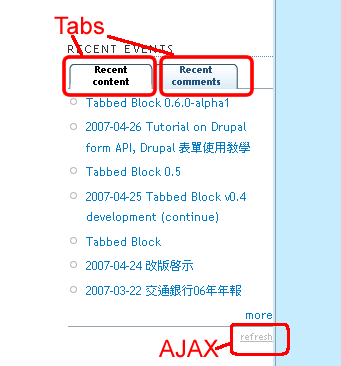

Tabbed Block 0.6.0-alpha1

V0.6 中終於提供多block 的環境
用戶可以新增不限數量的 tabbed block
設定介面也隨之改變
留意, 此為alpha 版, 只應使用於測試後(雖然已經花多了時間除蟲)
每一 tabbed_block 對應AJAX 刷新, IE, FF 設定可能等等

請先移除v0.5 tabbed block, 覆蓋v0.6, 安裝

v0.6 finally present with multi tabbed-block!
administer can add blocks without limit.
because of this, setting UI changes a little.
warning that this is a alpha release, only apply on test sites please.
every tabbed block with AJAX refresh, on IE, FF etc etc.....

Please uninstall v0.5 first, overwrite with v0.6, install.

2007-04-26 Tutorial on Drupal form API, Drupal 表單使用教學

原本打算先寫一個cck 的教學
但因為工作上的需要, 急需對Drupal form API 有深一點的認知
所以就埋頭苦幹, 翻讀又翻讀Drupal 主站的手冊
定要打好form 處理的根基

本文既翻譯官方手冊關於form API的一些部分
再加上自己的一點研發而成

表單乃任何應用系統的中心
令使用者和系統之間的交流具體化
確實請求, 遞交的介面, 公用接口等
如果沒有表單, 用戶只可被動的接受系統的一切
用戶的要求並不能傳到系統中,
像啞巴, 不能表達自己的訴求
用了表單, 用戶可以在系統允許的情況之下要求
如排序, 提交等等
所以一個小型的模組很可能已經需要使用表單,
作了解用戶的設定, 請求之用
可惜, Drupal 的 form API 使用概念上和html form 有頗大差異
但的確簡化了傳統上 顯示, 處理, 儲存 三個部分的處理

用form API 生成表單, 大概有三個地方可放代碼
*.module 文件, template 文件, block boxes.(hook_form_alter() 只用作修改, 而非建設表單)

*.module 文件中放代碼這方法為主流, 也正統, 又萬能
官網的教學全都集中在這個地方.
主要目的多是開發一個新的模組, 要設定模組的各參數而使用表格
學習上, 因為有很多現成模組的例子, 算是簡單
生成方法要從hook_menu 說起
user.module 為例:

<?php
$items
[] = array(
 
'path' => 'user',
 
'title' => t('User account'),
 
'callback' => 'drupal_get_form',
 
'callback arguments' => array('user_login'),
 
'access' => !$user->uid,
 
'type' => MENU_CALLBACK
);
?>

設定:
路徑(path) /%DRUPAL%/user
頁面標題(title) t('User account') (t()為可以翻譯)
存取時轉到函數(callback) drupal_get_form()
函數參數(callback arguments) array('user_login')
權限(access) !$user->uid (指已經登入者)

實際上呼叫函數drupal_get_form('user_login')
drupal_get_form('user_login') 呼叫 user_login(),

<?php
user_login
(){
...
 
$form['name'] = array(
   
'#type' => 'textfield',
   
'#title' => t('Username'),
   
'#size' => 60,
   
'#maxlength' => USERNAME_MAX_LENGTH,
   
'#required' => TRUE,
   
'#attributes' => array('tabindex' => '1'),
  );
...
  return
$form;
}
?>

例子中定義了一個textfield (#type)
field 的題目(類似說明)為t('Username') (t()為可以翻譯)
等等, 詳細參數表請參考API http://api.drupal.org/api/5/file/developer/topics/forms_api_reference.html
user_login() 最後返回變數$form, 給drupal_get_form()
表單顯示輸出部份到此完成
只要設定好 user_login, hook_menu,
其餘的部分(action, method, form_id, form tags)由Drupal 負責

接著是確認表單有效的步驟: ( 按了submit, button type 後 )
續用user_login 為例,
定義一個函數: 函數名_validate()

<?php
function user_login_validate($form_id, $form_values) {
  if (
$form_values['name']) {
 
//略
?>

$form_id 為 函數名
$form_values 為array, 像一般的$_POST 般使用
_validate() 認證錯誤的話, 使用form_set_error('login' , $message);
Drupal 自動跳回表單
否則不用返回, Drupal 跳到儲存函數

儲存函數: 函數名_submit
(按下type 為 submit 的元素後)

<?php
function user_login_submit($form_id, $form_values) {
/**
*  數據庫處理等等
*/
 
$message = 'submit complete';
  return
"/user".$user->uid;
}
?>

$form_id 為 函數名
$form_values 為array, 像一般的$_POST 般使用
返回值為路徑, Drupal 會跳到該路徑
並顯示$message

到此, 基本, 主要, 一般使用form API 的方法完成

Template 文件上使用form API 實際上違反了MVC 的概念
但卻能快速的實現表單, 添加和修改頁面隨意
如 "加一個表單到關於我們, 填電話吧" 之類的請求
用一個模組加上hook_form_alter, hook_node_api 會令模組管理混亂
系統效能下降的問題
而更麻煩的是開發時間長
使用template 能減輕一定程度的工作量,
特別當改動少, 但又不得不改代碼, CSS 不能代勞時.

使用概念跟使用druapl_get_form() 大致相約
template 中一樣要定義三個函數, 如

<?php
function user_login2(){
 
$form[]=array(
    ..........................
  );
  return
$form
}

function
user_login2_submit($form_id, $form_values){
  .............
}

function
user_login2_validate($form_id, $form_values){
  .............
}

print_r (drupal_get_form('user_login2'));

?>

最後用一句 print_r 就可以了,
Drupal 會顯示表單.
也使用 user_login2_validate() 確認
user_login2_submit() 提交

但留意, 切忌過份使用, 否則只會做成維護的困難
又,
如果只改動現有模組, 可先作處理, 再呼叫原模組:

<?php
function user_login2(){
 
$form[] = user_login();
 
$form[] = array(
    ....
  );
}
function
user_login2_submit($form_id, $form_values){
 
//more operation here
 
user_login($form_id,$form_values);
}
?>

至於block boxes,
block 可以自己定制, 可以使用php code內建到block
在site build->block 內有add block 選項
code 的使用和template 使用form API 的方法一樣
不再重覆, 主要使用print_r(drupal_get_form())
但值得一提的是block 的擺放位置, 如加上panels
幾乎可以放到任何位置, block 又可以設定何時顯示, 何時隐藏
又開發快速
唯一缺點, 如果php 代碼有錯, 將會做成修改不能的錯誤
要手動到資料庫修改, 故只適用於對php 非常熟悉的人使用

Originally want to write a tutorial about cck first.
However, because of my job, there is an emergency that i need to have a deeper knowledge about Drupal's form API.
So here comes hours ad hours study, rushing through drupal's handbook,
build up so solid base about form.

form system is a concrete base of any application.
it makes the communication between user and system become practical, applicatable,
include confirm requests, submit interface, public sockets etc etc.
if there is no forms at all, users can only accept the information from server passively.
user's request cannot be sent to server,
like mute, who cannot present themselves.
under forms, users can submit request upon their needs,
for example sorting or submit etc etc.
as a result, there may be already a need for forms even inside a small module.
but unluckily, the concept between Drupal's form API and HTML form is very different,
in terms of three core part of form: presentation, process, save.

To use from API to generate forms, there are three places that your code may place
*.module file, templates, boxes block. ( hook_form_alter() can only edit a form, but not create one )

form API inside *.module is the most popular method, Drupal style, and also powerful.
the tutorial inside drupal.org is mainly focus in this scoop.
This method is mainly used to configure the parameters of the module, during development a new module.
This method ie relatively easy to learn as there is many existing modules that you can refer to.
the start point is hook_menu():
use user.module as an example,

<?php
$items
[] = array(
 
'path' => 'user',
 
'title' => t('User account'),
 
'callback' => 'drupal_get_form',
 
'callback arguments' => array('user_login'),
 
'access' => !$user->uid,
 
'type' => MENU_CALLBACK
);
?>

details:
path /%DRUPAL%/user
title t('User account') (t()means translatable)
callback drupal_get_form()
callback arguments array('user_login')
access !$user->uid (means logged-in user)

in practical, this will have call a function drupal_get_form('user_login')
drupal_get_form calls user_login():

<?php
user_login
(){
//...some code before...
 
$form['name'] = array(
   
'#type' => 'textfield',
   
'#title' => t('Username'),
   
'#size' => 60,
   
'#maxlength' => USERNAME_MAX_LENGTH,
   
'#required' => TRUE,
   
'#attributes' => array('tabindex' => '1'),
  );
//...some more code...
 
return $form;
}
?>

In this example, it defines a textfield by #type,
the title of this field is Username (t()means translatable)
etc etc. and the parameters reference: http://api.drupal.org/api/5/file/developer/topics/forms_api_reference.html
finally, user_login() return the $form variable, back to drupal_get_form()
the output part of form finished.
you only have to setup user_login, hook_menu, the elements inside the form,
the rest part( action, method, form_id, form tags ) will left to Drupal.

next is the validation of form( by pressing any button, submit type ):
user_login() as example again,
define a new function inside *.module, named function _name_validate()

<?php
function user_login_validate($form_id, $form_values) {
  if (
$form_values['name']) {
 
// some code
?>

$form_id is the name of the form function,
$form_values is an array, like normal $_POST,
if validation fails, you may use form_set_error('login' , $message);
Drupal will jump back to the form
otherwise, drupal will jump to save process.

save function: function_name_submit()
(when press element that is 'submit' type)

<?php
function user_login_submit($form_id, $form_values) {
/**
*  database process
*/
 
$message = 'submit complete';
  return
"/user".$user->uid;
}
?>

$form_id is the name of the form function,
$form_values is an array, like normal $_POST,
return the path that will be redirected,
and display $message

up to this point, the basic use of form API finish.

The use of form API inside template file actually contradict the MVC concept,
but this method can build up form quickly, edit them quickly.
for example, a need of "add a form to about us, user may enter their phone number"
this kind of need is not worth to open a new module because of performance, long develop time
using template can reduce some workload,
especially when changes is small, but CSS cannot help.

the basic concept is the same, also use drupal_get_form(),
define three function inside the template file:

<?php
function user_login2(){
 
$form[]=array(
    ..........................
  );
  return
$form
}

function
user_login2_submit($form_id, $form_values){
  .............
}

function
user_login2_validate($form_id, $form_values){
  .............
}

print_r (drupal_get_form('user_login2'));

?>

finally use print_r, drupal will display the form.
user_login2_validate to process validation the form
user_login2_submit to save to database,

but keep in mind, do not use it frequently, which will increase the difficulties to maintain

finally, about from API inside block boxes,
as blocks can embed php code inside,
form can also embedded inside blocks.
the use of code is just like the use inside template,
use print_r(drupal_get_form()) again,
define three function....
one more to note, in combination with panels modules,
blocks can be placed everywhere, in specific page, specific place,
with fast development
the only disadvantage is, if there is php code error inside block,
you may face down site, which can only be repair from database.
so it is only advice to advance php users

Tabbed Block 0.5

Originally want to patch v0.4, but to solve the problems of image button in IE, huge code restructure is performed. so v0.5 is the version number.
Also, this version fixed the bug that self-defined block cannot show their correct title.
There is no change in database, so to install, just place all the files into %drupal%/module/tabbed_block

原本打算只補丁v0.4, 但因為在IE 上的image 按鈕出現問題, 整個處理表單的流程完全改變, 所以命名為v0.5
這版本同時修正: 自定義的block 標題錯誤
這版本升級只需要將zip 內的檔案放到%drupal%/module/tabbed_block 就可以了, 並沒有資料庫上的變更

2007-04-25 Tabbed Block v0.4 development (continue)

連日的開發, 修改了幾個問題
包括AJAX errors, IE 相容問題
改變發生錯誤時的顯示方式等等

AJAX 錯誤發生在tabbed_block.js 內,
如果用戶沒有使用jstools 模組就會發生問題
主要因為AJAX 的請求路徑(request url)使用了jstools 的一個add-on, Drupal.url()
原本錯誤地假定Drupal.url 為Drupal 內建(.....名字上的誤會, 但Drupal 的確內建了 Drupal 對象, 只是jstools 加強了Drupal 對象)
及後發覺來自jstools
改用tabbed_block.module 內

<?php
drupal_add_js
("var base_path = ".drupal_to_js(base_path()).";" , "inline" )
?>

將base_path 傳到js 內使用

IE href 屬性:
IE 相容問題, 除了CSS 上, tabs 更是使用不能
問題出自tabbed_block.js 一段jquery:
....略, 38行

$(this).click(function(){
  click = $(this).children("a").attr("href");
  $(click).siblings("div").each(function(){

39行的變數 click, 目的在取出a 的href
用作找回相應的div content
在firefox 上, 值為source code 內的值
但在IE 上, 值為一個絕對路徑(http://example.com/drupal/#fragment-1)
令40行找不到一個 http://example.com 的div
做成錯誤
用javascript 的字符函數取出解決

另, 停用IE anchor:
IE 的anchor 不可以在jquery內用 return false 停用(停止自動滾動)
改用inline 的方式

<a href="#frag1" onclick="return false;">tab head1</a>

在Drupal 內顯示錯誤:
原本為了方便開發
某些可以預計的錯誤使用print_r + exit() 處理
方便分析
但為了一般使用者方便, 及一體性
轉為使用drupal 內建的錯誤顯示方式:
<?php
druapl_set_message
( print_r $_POST , "error")
?>

加上注解等等之後
patched 的v0.41 待測試後發佈

下一個將增加的功能有非常多的用戶反映
「tabbed block module 可以使用多於一block」
類似adsense module
但改code 將會頗多, 會待v0.41 穩定下來再開發

After days of development, Tabbed Block module had fixed a couples of bugs,
include AJAX errors, incompatible in IE,
changes in UI when there is error....... etc etc

AJAX error happens inside file tabbed_block.js
If the user do not install jstools modules, problems happen.
It is because AJAX request path use a jstools add-on function call, Drupal.url()
which I assume the function is build-in Drupal (...misunderstand in naming. but Drupal did really have a build-in Drupal object, but jstools expanded it.)
It is solved by tabbed_block.module, a line

<?php
drupal_add_js
("var base_path = ".drupal_to_js(base_path()).";" , "inline" )
?>

using it to pass the base path(request path) to js

IE href properties:
incompatible in IE, other than CSS, more important is failure in using tabs.
the bug is a line from jquery from file tabbed_block.js, line 39:
....etc etc, line 38:

$(this).click(function(){
  click = $(this).children("a").attr("href");
  $(click).siblings("div").each(function(){

line 39 variable click, aim to get the attribute href,
finding the corresponding div
in FF, it returns the value in source code,
while in IE, it return absolute path: (http://example.com/drupal/#fragment-1)
causing line 40 cannot find a div with id http://example.com
it is solved by parsing the return string by string methods in js.

Also, disable IE anchor:
the anchor cannot be disabled by returning false from jquery
but a inline method works:

<a href="#frag1" onclick="return false;">tab head1</a>

Display errors inside Drupal:
originally, becoz of the convience for development,
some predictable errors use print_r + exit() to catch
but as release goes, more focus is put on end-user,
so it changed to Drupal-style:
<?php
druapl_set_message
( print_r $_POST , "error")
?>

And some other addings in comments,
patched v0.41 will be release after test

The coming feature that will be added is "multi-block",
like adsense module.
And it is required by many users,
but the change in code will be huge,
so it will start after v0.41 is stable.

Tabbed Block 0.4.0

Bugs fixed: localizer error
臭蟲修正: 本地化時錯誤

In this release, other than bug fixed,
this version no longer needs tabs plugin,
but use a self-contained javascript to provide tabs
which means no more place of jquery1.1.2 is needed

這個v0.4, 除了除蟲之外,
也放棄了jquery 的 tabs-plugi,
而用一個自帶的function 實現tabs 的效果
即是說, jquery1.1.2 己經不再需要了

Tabbed Block v0.4 Release

Bugs fixed: localizer error
臭蟲修正: 本地化時錯誤

In this release, other than bug fixed,
this version no longer needs tabs plugin,
but use a self-contained javascript to provide tabs
which means no more place of jquery1.1.2 is needed

這個v0.4, 除了除蟲之外,
也放棄了jquery 的 tabs-plugi,
而用一個自帶的function 實現tabs 的效果
即是說, jquery1.1.2 己經不再需要了

svn: Revision 0.4

2007-04-20 Tabbed Block 開發要點

很開心第一個實用的模組終於都算是「可以測試」
續上一回, 分享一下開發模組的小小心得
待同好可以互相交流, 提點一下這個初生之犢

入正題, 這個模組取自上一回的簡單的測試源碼
主要加入一個可以選擇模組的功能
雖然事前已經知道這個簡單功能牽連甚廣
但做著做著才知道這個功能牽連:
資料庫讀, 存
表格

資料庫的讀寫因為只需要記下模組的次序和名字
用內建的variable 表就可以了( 一個儲什麼也可以的地方 )
drupal 自己也有api 提供讀寫刪操作
variable_set( ''tabbed_block_settings'' , ''blog-0'' );
就可以將blog-0 放到 資料庫
你也可以將array 直接放到 arg2 中,
drupal core 會幫你處理, 而模組中就是將
0=>blog-0
1=>user-2
之類的順序放到tabbed_block_settings 中
而讀的代碼為
$block_list = variable_get( ''tabbed_block_settings'' , array() );
如果arg1的值找不到 則返回arg2

當然, hook_block() 的代碼也改變甚多
因為不再是hardcode, 而是要從資料庫中取出資料
再輸出相關html code
輸出html code 的部份用了views 模組的代碼
其他部份改動不是太大
只設定一個好用, 效率高的data structure 傳到輸出代碼的function 就可以了

頭大的是表單的處理
drupal 內建了一個form api
高度的abstraction 讓開發者可以簡單的寫出表單和作表單的處理
但abstraction 的程度太深, 反而要重新適應寫form 的方法
而且Tabbed Block 的表單處理方法中, 只有用戶按了save 才會儲存
令表單要記住每一個改變, 每一個add, delete, moves
這有別於一般的表單為這模組的開發帶來了不少的麻煩
參考views 模組也不得要領
最後唯有用了一個自創的方法tabbed_block_admin_setting()來實現
這function 同時處理add, delete, move, save
有點擁腫, 也用了$_POST 這類傳統的方法處理表單, 為節衷的方法

講一下form 的組成
drupal 主站有很多的方法
api.drupal.org 也有form quick start guide
這裡用的是quickguide 的方法
function form_build(){
$form[]=array(.......);
}
//hook_menu 內的callback:
''#callback''=>drupal_get_form(''form_build''),

這是最直接, 簡單的方法
特別適合全頁只有一張大表格
而且不會用到table 的地方
但如果大家留意到, move up, delete 的位置有一個類似table的
但直實只是視覺上似table, 實際是用了空格來排版
做到類似views, cck 的方式做設定

這模組設定的部份原理上已經跟cck, views 一類巨大的模組看齊
可以說是一個非常成功的, 練習用, 測試用的模組.

p.s. Tabbed Block v0.4 即將發佈
解決一定要使用jquery1.1.3 的問題
和中文化之後的error 問題

p.s.s. 一個新的模組也將會於近日發佈
請留意最新消息

2007-04-13 新地址

恭喜你
如果你見到這個post,
代表我的blog 已經搬好家囉!
新的地址為 http://www.joetsuihk.com

為了迎接新的地址,
Tabbed block for Drupal 將會release 一個alpha 版
並用 Drupal 來trace issues, bugs.
但請等一下.......

這個module 可以將任何一, 數個block 放到tabbed block 內
並且用tab 的表現方式展示.