Drupal 6.x

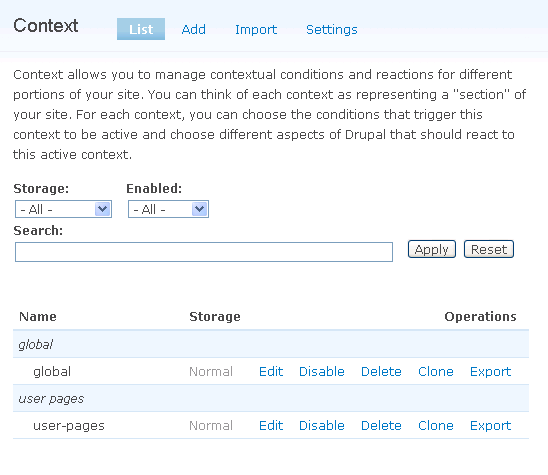
什麼是 context

Context 模組的功能其實和區塊的顯示設定 (visibility) 很相似
就是 "根據某些條件" 顯示 "某些區塊"
例如, 在 "用戶頁面" 顯示 "用戶的資料區塊"
所以, 假如你發覺你的區塊設定變得很複雜而且維護很困難的時候
你便應該要使用 context 模組了 >Read more
CCK fields hook_form_alter CCK 欄位的修改

如果大家一直都有看我的 blog
相信都對使用 hook_form_alter() 很熟識
修改, 新增各種說明文字是小菜
將整個表單完全改頭換成志玲一樣美都沒有難度

這次是修改 CCK 的欄位
一個日期的欄位, 只是很簡單的需要多一點說明的文字,
再組合兩個日期
但我發覺 hook_form_alter 的 $form是沒有 CCK 的欄位的
因為 form API 的流程還沒有經過 CCK
所以需要延後處理$form
form API 的 #after_build 正是為這而設

<?php
function joe_form_alter(&$form, $form_state, $form_id) {
 
$form['#after_build'][] = 'joe_after_buid_callback';
}
function
joe_after_buid_callback($form, &$form_state) {
 
//這邊就可以修改 CCK 的欄位了
 
$form['field_start_date']['#description'] = 'WOo wOo';
  return
$form;
}
?>

更多資訊: http://drupal.org/node/726282

Drupal 的 Javascript 變數陣列

Drupal 是一個CMS, 它除了有很多 PHP 的函數 可以調用之外,
還有在頁面的 javascript 加了一些常用的變數, 函數
你可以在 firebug 或者 chrome 的 developer console內,
Drupal.* 找到它們

例如 PHP 函數<?php base_path()?> 可以在 Drupal.settings.basePath 內找到
所以 AJAX 的要求路徑便可以隨網站路徑自動改變了

form 也可以使用template (*.tpl.php) (Drupal6.x 版)

舊文:
http://www.joetsuihk.com/form_templates
的做法不太正統, 應該要改成: (用 user-login form 為例):

theme 的 template.php 之內:

<?php
//theme name + form id
MYTHEME_user_login() {
  return array(
   
'user_login' => array(
     
'arguments' => array('form' => NULL),
     
'template' => 'user-login',
    ),
  );
}
?>

清緩存,
便可以在你的 theme 之內建立一個 user-login.tpl.php 直接使用
<?php drupal_render($form);?>

<?php drupal_render($form['name']);?>

等等

Updating views fields changes field alias names

When views is using fields as output,
you can hidden the field, and echo them in other field templates
you will get an alias, but that alias is willing to change.
So you cannot hardcode that in tpl files.

In order to retrieve the alias and its value:

<?php
//within field tpl files
$value = $view->field['field_host_value']->render($row);
?>

http://drupal.org/node/361756#comment-4424090

當使用Views 輸出fields 的時候, 你可以隐藏 (hidden) 一個 field
但這個 field 的別名 (alias) 是會改變的
所以你不可以將這個別名寫到 code 內

要在 code 取得這個別名,

<?php
//within field tpl files
$value = $view->field['field_host_value']->render($row);
?>

http://drupal.org/node/361756#comment-4424090

Views 過濾列表預設不返回結果 Views exposed filter default show zero result
Show No Results by Default

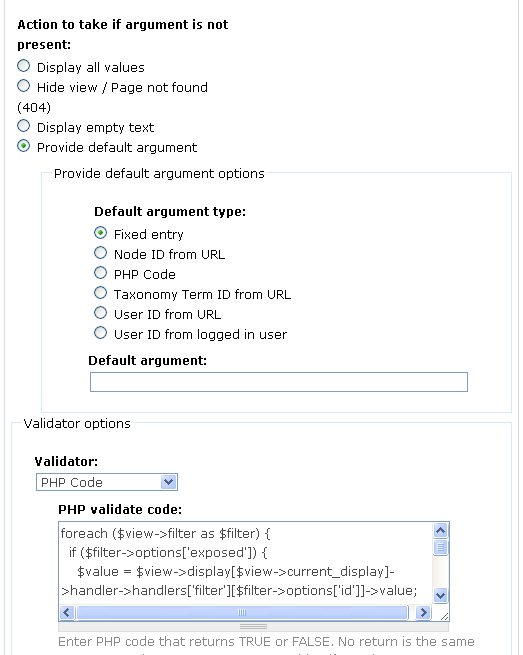
原理是使用 Global argument
如果 filter 的返回值都是預設值的話, 用 argument 返回 false,
再輸出 empty text 或者不輸出值

arguments: Global Null
provide default argument
fixed entry
PHP Code:

<?php
foreach ($view->filter as $filter) {
  if (
$filter->options['exposed']) {
   
$value = $view->display[$view->current_display]->handler->handlers['filter'][$filter->options['id']]->value;   
    if(!empty(
$value)) {
      if(
is_array($value)) {
       
$val = array_pop($value);
        if(!empty(
$val)) {
          return
true;
        }
      }else{
        if(!empty(
$value)) {
          return
true;
        }
      }
    }
  }
}
return
false;
?>

改變 form 的 template

這次修改的是 views 的 exposed form
需要比較大的修改便想要使用 tpl 而不使用 template.php
舊文 form 也可以使用template (*.tpl.php)也有說明, 但已經不是 Drupal6.x 作法了

以下更新為 Drupal6.x 的作法:
先自建一個模組, 使用 hook_theme
定義如下:

<?php
function mymodule_theme($existing, $type, $theme, $path) {
  return array(
   
//form id
   
'form_id' => array(
     
'arguments' => array('node' => NULL),
     
'template' => 'search_form', //表示使用 search_form.tpl.php
   
),
  );
}
?>

重點在於提供一個 template 的值, 你便可以在該 tpl 檔使用 <?php $form; ?>
再使用 <?php drupal_render($form['title']); ?> 之類完成 form 的 各欄位和 html 碼

最後, 實作的時候記得清緩存就可以了

[Contribution to Doc] Webform confirmation page

需要修改 webform 模組的完成頁面,
而且需要根據 webform 的內容客製化,
例如 "感謝[firstname] [lastname] 的聯絡, 我們會盡快回覆."
Google 一下, 找到 Confirmation Page Usage of Form Components or Variables

但根據了指示仍不得要領, 發現了一個 bug,
webform.submissions.inc 的路徑改變了, 所以就成就了以下的修改
http://drupal.org/node/600696/revisions/view/738336/1354722


2011-02-07 為 form 增加新的 validation 規則

hook_form_alter() 本來是為了修改 form 的各種屬性
例如增加欄位, 修改欄位的預設值等等
但其實還可以增加 validation 規則和增加提交後的處理

增加 validation 規則:

<?php
function mymodule_form_alter(&$form,$form_state, $form_id) {
  if(
$form_id=='user_register') { //只是一個例子, 你可以填入需要的 form id
    //為 #validate 陣列增加一個元素, 元素的值就是新的 validate 函數名
   
$form['#validate'][] = 'mymodule_new_user_register_validation';
  }
}

//然後定義新的 validate 函數, 帶入兩個參數
function mymodule_new_user_register_validation($form, &$form_state) {
 
//$form_state['values'] 儲存用戶提交的數據
 
if(strpos('admin',$form_state['values']['username'])===false) {
   
//用戶名字不可以有 admin 的字眼
   
form_set_error('username', '用戶名字不可以有 admin 的字眼');
  }
}
?>

增加提交後的處理:

<?php
function mymodule_form_alter(&$form,$form_state, $form_id) {
  if(
$form_id=='user_register') {
   
//為 #submit 陣列增加一個元素, 元素的值就是新的提交後處理函數
   
$form['#submit'][] = 'mymodule_new_user_register_submit';
  }
}

//然後定義新的 validate 函數, 帶入兩個參數
function mymodule_new_user_register_submit($form, &$form_state) {
 
//$form_state['values'] 儲存用戶提交的數據
 
drupal_set_message('Welcome, '.$form_state['values']['username']);
}
?>

相關:
Drupal form API
hook_submit, hook_form_alter, hook_validate in Drupal 6.x

Computed Field: 在另一個檔案提供代碼算式 compute in file

Computed Field 是一種 cck 使用的 field type,
類似 imagefield, 但主要提供是一個地方,
放的是一個算式的結果.

例如有中英數三個整數欄位,
我可以加一個 computed field, 儲存的數值是他們三個的和
然後我就可以輕鬆根據這個數值, 使用 views, 例出, 排序學生們的總分

Computed field 提供一個 textarea 輸入算式, 但也提供以特定的函數命名提供算式
它自己的說明清楚提示這個命名, 但就沒有這個函數應該使用的參數和返回值, 實例如下:

<?php
/**
* <obj> $node that contains all field values
* <array> $field
* <array> $node_field that store this computed field value
**/
function computed_field_[field_name]_compute(&$node, $field, &$node_field) {
 
//$node_field[0]['value'] 就是實際存起來的結果
 
$node_field[0]['value'] = sum($node->field_math[0]['value'],$node->field_eng[0]['value']);
 
}
?>