Drupal commerce - 從代碼建立訂單

Drupal commerce 己經成為 Drupal 電子商務應用的主流了,ubercart 落伍了
Ubercart 是一個源自 Drupal5.x 世代的方案
而為了使用 Drupal7 方便的 entities,和令電子商務方案使用一個「弱品牌化」的名字,Drupal commerce 誕生了
但因為 Drupal commerce 龐大的代碼量,為了方便分散工作,代碼都打散到不同的模組,各自有他們的維護者
再加上為數不少的 dependencies 令上手的難度過大
所以 Drupal commerce kickstart 便將一個完整的電子商務網站包裝起來
只需要下載安裝,匯入範例便可以立即使用了
這次的開發和前一次類似,從代碼建立將貨物放到訂單:
Create Drupal commerce order programatically
Drupal commerce had become the major implementation of all-in-one ecommerce solution, from ubercart.
Ubercart was long from Drupal5.x era
To work with entities that build-in Drupal7, and also make Drupal's commerce solution brand-less, Drupal commerce was born.
Drupal Camp Taipei 2013
It is an honour to be invited to Taipei Drupal Camp this year
I submitted a migrate content case study
and got in successfully http://2013.drupalcamp.tw/session/83
So booking air tickets, sleeping bed, prepare slideshow
join the second day's hackathon etc
Thanks TKY had been helping and inviting me
And this is the exact right time to "exchange" outside HK when I started my own business
Get some fame, seeking co-working opportunities with Taiwan
Drupal Camp Taipei 2013
今年有幸再一次被邀請到台灣 Drupal Camp
提交了一個我自己使用 migrate 的 case study
順利獲選 http://2013.drupalcamp.tw/session/83
之後便開始訂機票,住宿,準備 slideshow
報名參加第二日的 hackathon 等等
要感謝 TKY 一直的提名,協助
正好在自己開展事業的一年到外交流
打一下名氣,也看看和台灣的同行有沒有合作的機會
vim 中設定正確的 php 文法高亮 filetype php.html sinppets
Drupal 的 php, module, tpl.php 檔會包含 html 和 php 的代碼
而vim 預設的情況之下不會對 php 檔內的 html 碼高亮
但只要設定使用 php.html 就可以先高亮處理 php, 再處理 html 高亮, 例:
augroup php
  "php file also use html snippnets
  autocmd BufRead,BufNewFile *.php set filetype=php.html
augroup END
而如果你有使用 snipemate 的話,
Drupal 有一個snipmate 的庫可以使用
Vim SnipMate for Drupal
https://github.com/theunraveler/Drupal-Snippets-for-Vim
Drush 5.x-dev 支持視窗系統 support Windows system!
http://drupal.org/project/drush
下載點: http://drush.ws/resources
下載完成直接雙擊安裝
安裝完成便可以雙擊桌面圖示, cd 到你的 Drupal root, 開始使用 Drush
還有, Drupal 已經轉用 git 作為版本椌制系統
Windows 下你可以使用 msysgit http://code.google.com/p/msysgit/
它帶有一個 msysgit shell, 可以使用 linux 命令, Drush 命令
什麼是 Drush
Drush 是一個面向開發者的工具/模組
它是一個使用命令行的工具, 可以說是 Drupal 的遇萬用工具刀
先談一下命令行$ drush dl views
以上的代碼, $ 是命令行的開始drush dl views 是開發者輸入的部份
*nix 或者 Mac 可以使用原生命令行
Windows 內: "開始" -> "執行" -> 輸入 "cmd" 便會打開命令行
入正題, 例子 $ drush dl views
一句命令便可以將 views 模組從 drupal.org 下載, 解壓到 sites/all/modules$ drush dl zen 下載, 解壓到 sites/all/themes$ drush en views 便可以啟用 views$ drush cc 清除緩存
Drupalcon London 2011 session Video
沒有機會參與的Drupal 開發者 (例如我) 一樣可以線上觀看這次 Drupalcon 的 session
http://blip.tv/drupalcon 已經有很多精彩的session
實用的例如 An Introduction to Form Builder 是很好用的開發者工具,
themes How to Theme Like A Rockstar
A Bulletproof Approach to Theming
控制 variables table 的值
Variables tables 有很多零碎的設定值
模組需要儲存的簡單資料可以很方便使用 system_settings_form() 的放到 variables
但有些情況之下將 variables 放到資料庫是不方便的
其中一個例子是測試環境和 production 不一樣的時候
deployment 完成之後還要再修改資料庫
步驟多, 又是人手操作, 錯誤便容易發生
例如 gmap 模組需要一個 Google map API key
而該 key 則是 google 根據 domain產生的
例如 uat.joetsuihk.com 和 www.joetsuihk.com 使用的 API key 便不一樣
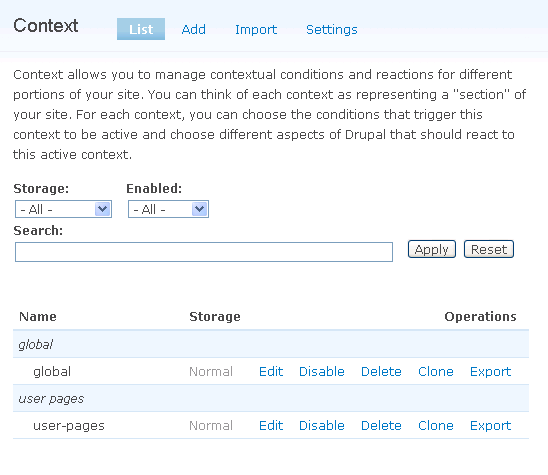
什麼是 context
Context 模組的功能其實和區塊的顯示設定 (visibility) 很相似
就是 "根據某些條件" 顯示 "某些區塊"
例如, 在 "用戶頁面" 顯示 "用戶的資料區塊"
所以, 假如你發覺你的區塊設定變得很複雜而且維護很困難的時候
你便應該要使用 context 模組了
而我將 context 模組放到這麼前的版面是因為,
我覺得它已經成為了一個 Drupal 網站不可或缺的模組了
重要的程度比 panels 還高一點
介紹 context 的用法之前
需要先了解 context 模組的一些新詞彙:

