advanced

建立一個自定義的區塊模組, 管理複雜的內容和權限設定 custom block module for complex block content and visability

專為右欄複雜的內容和複雜的顯示設定而建立一個模組管理有幾個好處:

1. 返回NULL 便可以令系統跳過
很方便的就可以處理不顯示的狀態
先檢查顯示與否, 不顯示或權限不足便返回 NULL

2. 源碼管理軟件 (scm) 可以助管理
傳統的 add block 方法將block 內容和顯示的邏輯放到資料庫
不利於 scm 管理
而且使用文件的方式儲存代碼更加有更新容易, 除錯容易等等的優點
身為開發者, 而不是使用者, 有責任為網站提供一個更容易維護的環境

3. 避免將錯誤的PHP 放到資料庫
在顯示設定很多時候都會用到 PHP code
而錯誤的 syntax error 的 PHP code 放到資料庫,
會為頁面不能顯示, 也不可以使用 web 介面修改
要到資料庫中修改, 很麻煩

build a module only for complex blocks have several pros:
1. simple "do not display"
check the visability first,
just return nothing for empty blocks, or access denied cases
system will skip them.

2. Source control management (scm) can help
traditional "add block" method put block content and related visability settings in database
which do not fit with scm.
The use of a module file to store code promotes later updates, easier debugging
Also, as a developer, but not a user, there is a responsibility to provide a better maintainable environment.

3. avoid DB crash upon error php code in database
in visability, PHP is often used
and the syntax errored PHP code will also got stored, and crash the page.
You cannot correct it through web interface,
but have to open a database connection and edit them, very trouble

進階 views 模版(一): 簡介, 設定, tpl 檔 Complex views templating, part 1, intro, config, tpl

views 的 theming/templating 是Drupal theming 的高級班了
之前一直沒有信心將這個部份的教做好, 但這次都要挑戰一下難度, 唯有試試用多一點圖片展示了

首先, 我們常用的theme developer 是不能夠幫我們查出 tpl 的檔名的 (但仍可以看到可用的 vars)
因為 views 的 templating 機制雖和 Drupal core 的極相似, 但卻是views 自己定義的
主要是為了應付更複雜, 更多變的情況
但也不需要擔心, 概念上, 操作上都和我們一向做的非常相似

既然theme developer 不適用, views 有自己的 tpl suggestion: Basic settings 內的 Theme: information(下圖1)
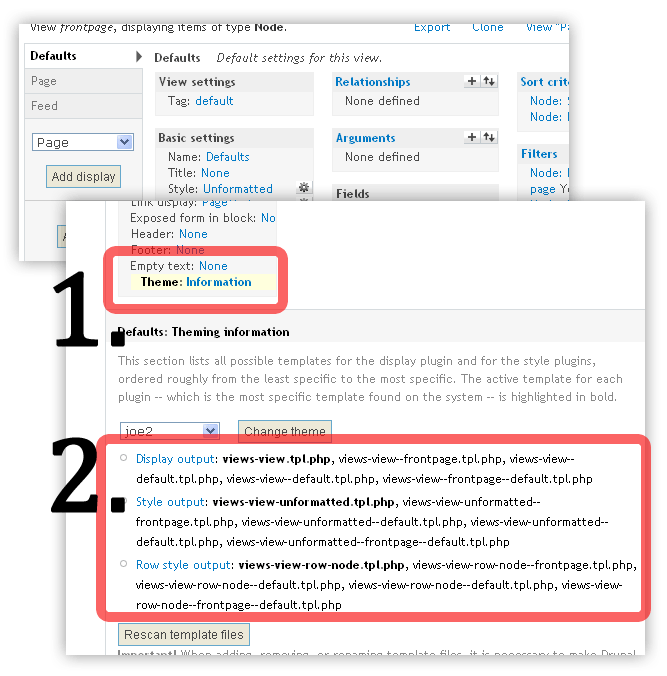
上圖二便是 tpl suggestions, 而粗體則是現正在使用的 tpl 檔


你可以看到, 一個views 便有三個為一組的 tpl,
而其實如果你使用 "fields" 的話, 你的 views display 更由四個 tpl 組成

我們看看三個 tpl 各自負責那一部份的 output:

你會發現, display output 和 row style output 重叠了
那是因為我正在使用 "unformatted", 如果你用 "table" 或者 "unordered list"
row style output 便會改變成 table, ul tags 了

假如你鎖定了某一個 tpl, 你可以從 views 內建的 code 開始
你只要點一下 "display output", 你便會得到views 自己內建的 tpl code了
而且內建的 code comment 都很清楚, 只是需要更多變數的話, 還是使用 theme developer 點一下就好了.

待續..