| Attachment | Size |
|---|---|
 views4-1.png views4-1.png | 40.15 KB |
| views4-2.png | 32.96 KB |
| views4-3.png | 63.52 KB |
wizard 內左面的按鈕其實是用來定義fields 之間的theme 的
類似contemplate, 但用之於views 之內
(contemplate 都可以用於views 的full node, teaser view 之內, 但非list, table view)
和右面的按鈕一樣,
這些選項都只可用於list view
但list 正正是最自由的顯示方式吧
這個修改方式揉合了node-template, css, phptemplate 等多個方法
所以請先對這些theme 用法, 不同, 相同之處讀熟才會事半功倍
也是這個原因, 留這一部份到最後一章
為免抽象, 用例子說明,
假設有一堆商品, 有帽子, t-shirt, 褲子
但因為他們的顯示排版方式一樣
它們被設計成一個content type, 名為product
然後用taxonomy 的方法將它們分類, cap, t-shirt, shorts....
一個商品必需為一個分類之下
而要求是
先有一個商品頁面, 列出商品的全部分類
而一個分類需要展示一個該類別的商品圖片
點撃圖片進入該類別, 類別之內才展示該類別的全部商品
分析一下, 這裡需兩個views
1. 一個列出全部類別,
2. 一個列出單一類別的全部商品
第二個views taxonomy 已經內建了, 不用花太多工夫
只要調整list view 的排版, 之前的教學也有提及, 不再重複
第一個views 才是重點
重點在於, 列出類別的同時也要有節點
而且只是一個節點的一個圖片
我用的方法是將全部節點列出, 只顯示圖片, 再用類別組合它們
"全部節點列出, 只顯示圖片" 是views 的功能, 當然fields 除了圖片, 也要taxonomy terms
"組合它們"就要使用views themes wizard
Theme wizard 內: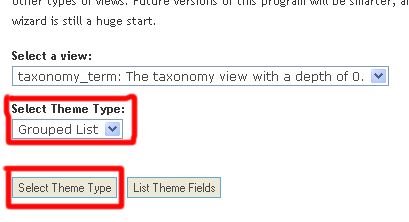
圖中的紅色方框選擇
Grouped list
再按Select theme type(紅框)
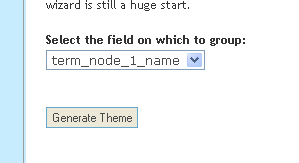
再在圖中的group select list 內選擇term,
因為要將term 組合起來
按generate theme
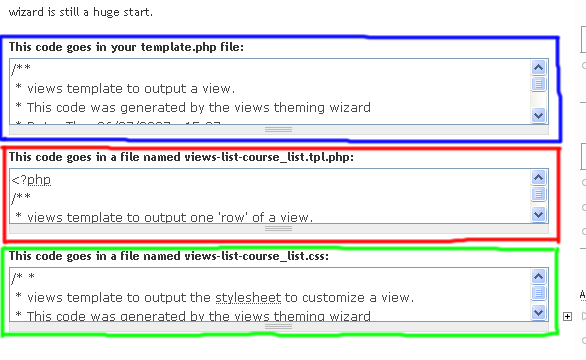
圖三分成三個textarea
一個textarea 為一個file 的內容
紅色, 綠色框的內容, 根據指示, 在你的theme 內建立相關的檔案
貼上內容就可以了
而藍色框的內容是放到template.php 之內
原理也在之前的教學有提及過
但這個方法是會將全部nodes 都顯示出來, 而非只顯示一張圖片
所以template.php 的一段還要修改
例子
<?php
/**
 * views template to output a view.
 * This code was generated by the views theming wizard
 * Date: Thu, 06/07/2007 - 15:37
 * View: course_list
 *
 * This function goes in your template.php file
 */
function phptemplate_views_view_list_course_list($view, $nodes, $type) {
  $fields = _views_get_fields();

  $taken = array();

  // Group our nodes
  //修改: 原本為做出一個相同taxonomy 的array
  /*原code
  $set = array();
  foreach ($nodes as $node) {
    $set[$node->term_node_1_name][] = $node;
  }
  */
  //修改為:
  $set = array();
  foreach ($nodes as $node) {
    //為了只插入第一個node
    if ( !isset( $set[$node->term_node_1_name] )){
      $set[$node->term_node_1_name][] = $node;
    }
  }

  // Set up the fields in nicely named chunks.
  foreach ($view->field as $id => $field) {
    $field_name = $field['field'];
    if (isset($taken[$field_name])) {
      $field_name = $field['queryname'];
    }
    $taken[$field_name] = true;
    $field_names[$id] = $field_name;
  }

  // Set up some variables that won't change.
  $base_vars = array(
    'view' => $view,
    'view_type' => $type,
  );

  $output = '';
  foreach ($set as $label => $nodes) {
    $items = array();
    foreach ($nodes as $i => $node) {
      $vars = $base_vars;
      $vars['node'] = $node;
      $vars['count'] = $i;
      $vars['stripe'] = $i % 2 ? 'even' : 'odd';
      foreach ($view->field as $id => $field) {
        $name = $field_names[$id];
        $vars[$name] = views_theme_field('views_handle_field', $field['queryname'], $fields, $field, $node, $view);
        if (isset($field['label'])) {
          $vars[$name . '_label'] = $field['label'];
        }
      }
      $items[] = _phptemplate_callback('views-list-course_list', $vars);
    }
    if ($items) {
      $output .= theme('item_list', $items, $label);
    }
  }
  return $output;
}
?>
只修改了一小段
功能上就已經可以了
但theming 上, 因為用了 theme_item_list()
而一個items 又只有一個node, 會比較奇怪
但要如何改theme function 之前也有提及, 也不再重複了
到此, 一連四篇的views theming 暫告一段落
直到我再想到一些views 應用, 再和大家見面,
也歡迎意見, 那裡不太清楚, 需要多點圖片
或有新的應用提出, 都歡迎聯絡我, 或留言



