2. Drupal cck contemplate theming 2

原本打算講解一下views 的theming
但發覺contemplate 的部分太草率
還是再詳盡解說一下應用技巧

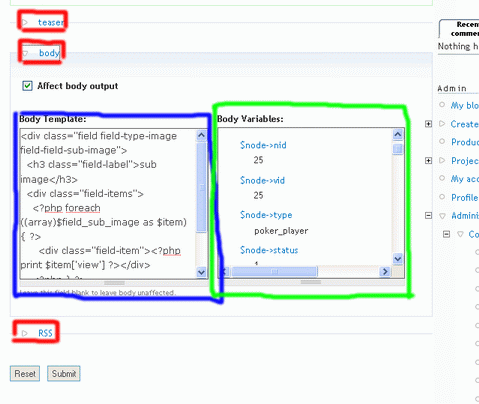
contemplate 的設定介面分成三個群組
teaser, body, RSS (圖中紅框)
teaser 是撮要, 一般的首頁都使用撮要的顯示
雖然撮要的內容可能和正文一樣

題外話:
Drupal 內建的撮要機制令撮要獨立的放到一個field 中處理
所以當儲存node 的時候沒有設定撮要,
則及後再開撮要都沒有顯示撮要

contemplate 可以對teaser, body, RSS 作特定的顯示方式
而修改的方法則完全一樣
左面的窗口是輸出的php, html 代碼 (圖中藍框)
右面為一些可用的php 變數 (圖中綠框)
先按Affect body output 激活左面窗口
然後隨意修改html, php
再在右面的窗口按你想加入的變數, 如$node->title, $node->type 等
相關的code 就會加到左面的窗口了

按submit 就大功告成了
AttachmentSize
contemplate1.gif31.65 KB

Comments

讲得太简单了,事实

讲得太简单了,事实上contemplate不是那么容易上手的!

可以說明一下難度所

可以說明一下難度所在?
那我可以再詳細的說明一下

Post new comment

The content of this field is kept private and will not be shown publicly.
  • Web page addresses and e-mail addresses turn into links automatically.
  • Allowed HTML tags: <a> <em> <strong> <cite> <code> <ul> <ol> <li> <dl> <dt> <dd> <img> <h4> <h3>
  • Lines and paragraphs break automatically.
  • You may post code using <code>...</code> (generic) or <?php ... ?> (highlighted PHP) tags.

More information about formatting options
